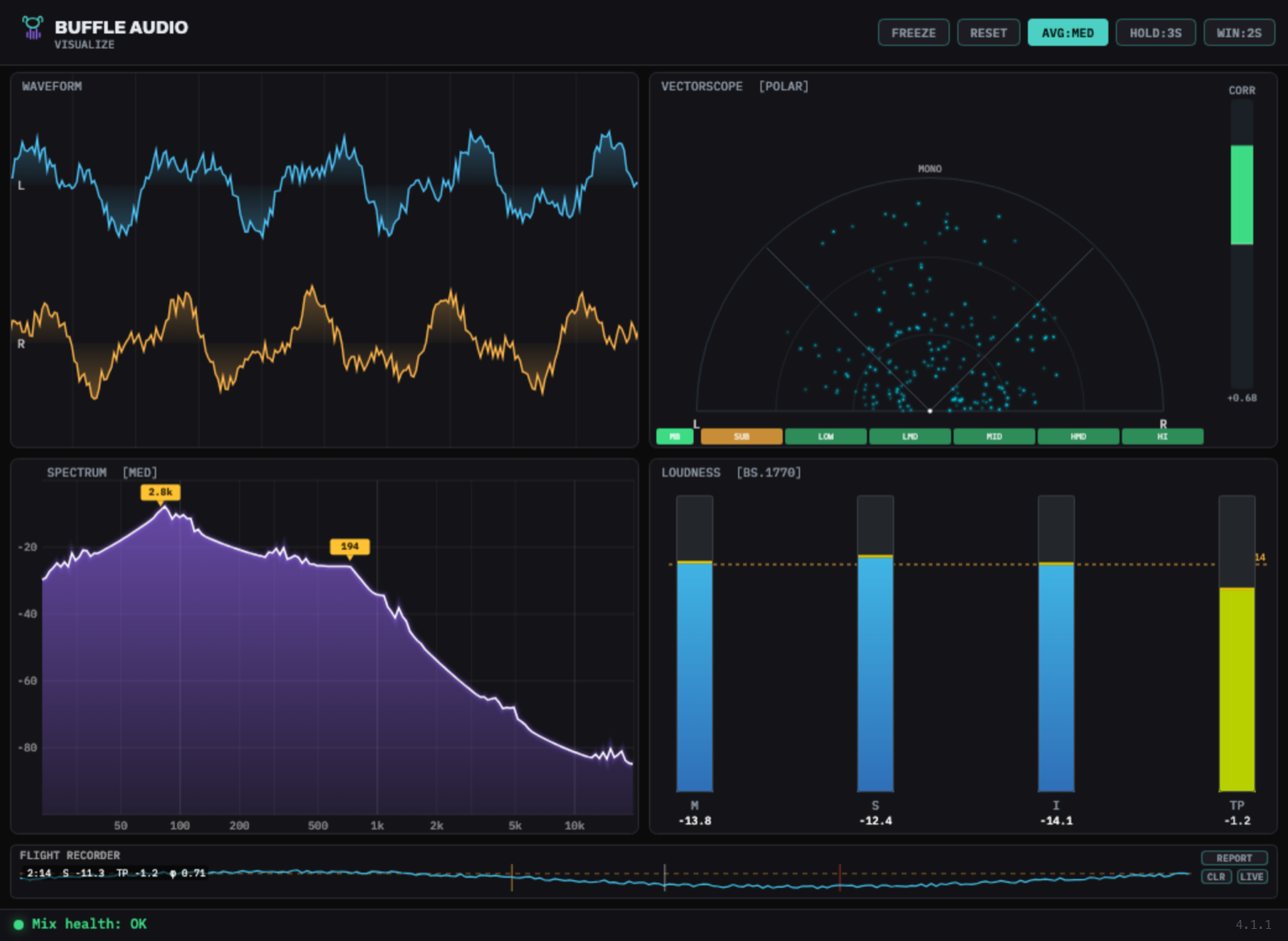
A professional real-time audio analyzer — waveform, vectorscope, spectrum and loudness in one responsive view — with six decision-support features that turn measurements into answers. Analysis-only: your audio passes through untouched, at zero latency.
A responsive 2×2 grid you can resize from compact to full-screen. Every panel updates in real time and explains itself on hover.
Left in cyan, right in amber, with a gradient fill and a 2 / 5 / 10-second window. 60 fps.
Click to switch between M/S Lissajous and an Ozone-style polar dome. Smoothed correlation meter.
4096-point FFT, log 20 Hz–20 kHz, 4.5 dB/oct tilt so mixes read flat, peak-hold frequency tags.
ITU-R BS.1770-4 LUFS (M/S/I, gated), 4× oversampled true peak, EBU LRA, −14 LUFS target line.
Every analyzer shows you data. These turn the data into decisions — and no competing analyzer combines them.
Correlation per 6 frequency bands, plus a dedicated mono-bass alarm — catch out-of-phase lows before they vanish on club and vinyl systems.
Load up to four reference tracks. Instead of chasing one curve, you get a min–max tolerance band — stay inside the corridor of great masters.
Preview your mix through a phone, earbuds, a car or a club — the analysis re-weights, the audio never changes. See what survives on each system.
A rule engine watches every metric and tells you what's wrong in plain language, with a severity dot in the footer and a timestamped feed.
Logs the whole session at 10 Hz. Scrub the timeline to read any moment, then export a self-contained HTML mix report to hand off or archive.
A Bark-scale estimate of which frequencies are perceptually buried by louder neighbours — it names the masker so you know exactly what to carve.
The actual interface — rendered from the plugin's exact colours, layout and states, with signal flowing through every analyzer.
Zero telemetry. File access is limited to a reference you choose and a report you save.
Analysis-only. Samples pass through bit-for-bit with zero added latency.
Passes pluginval at strictness 10 — the strictest setting — every release.
MIT-licensed source with a dedicated auditor's guide and architecture docs.
# regenerate the Xcode project from the .jucer JUCE/Projucer.app/Contents/MacOS/Projucer \ --resave WaveformVisualizer/buffleaudio_visualize.jucer # build the Release VST3 cd WaveformVisualizer/Builds/MacOSX xcodebuild -configuration Release \ -scheme "buffleaudio_visualize - VST3" build # or build the whole installer ./Installer/build_installer.sh